> ## Documentation Index
> Fetch the complete documentation index at: https://docs.realtalkstudio.com/llms.txt
> Use this file to discover all available pages before exploring further.
# Feedback & evidence
> Post-session scoring, annotated transcripts, skills breakdown, and compliance evidence
Every completed session produces **scored feedback** — behavioural evidence you can share with managers, L\&D, or compliance teams. This guide covers the learner-facing feedback flow and what admins can export.
## Roleplay feedback — four steps
After a 1:1 or team roleplay, learners walk through a linear four-step flow:
Glanceable scorecard — overall score, win/next cards, cohort rank, and **Practise again**.
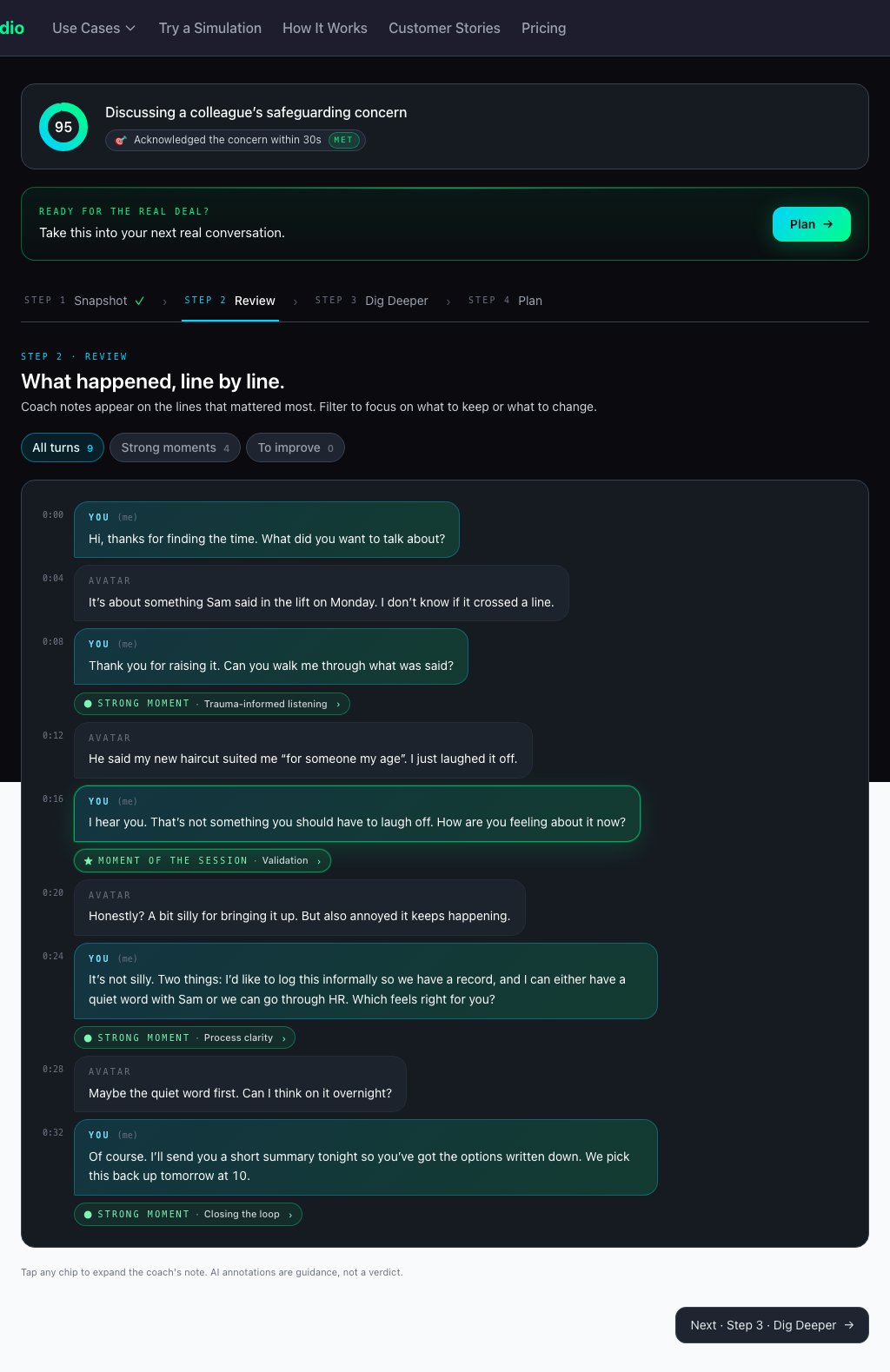
Annotated transcript timeline with coach notes and mood chips; jump to any turn.
Skills proficiency ladder (Novice → Expert), delivery metrics, presence, policy adherence, and product knowledge *(when configured)*.
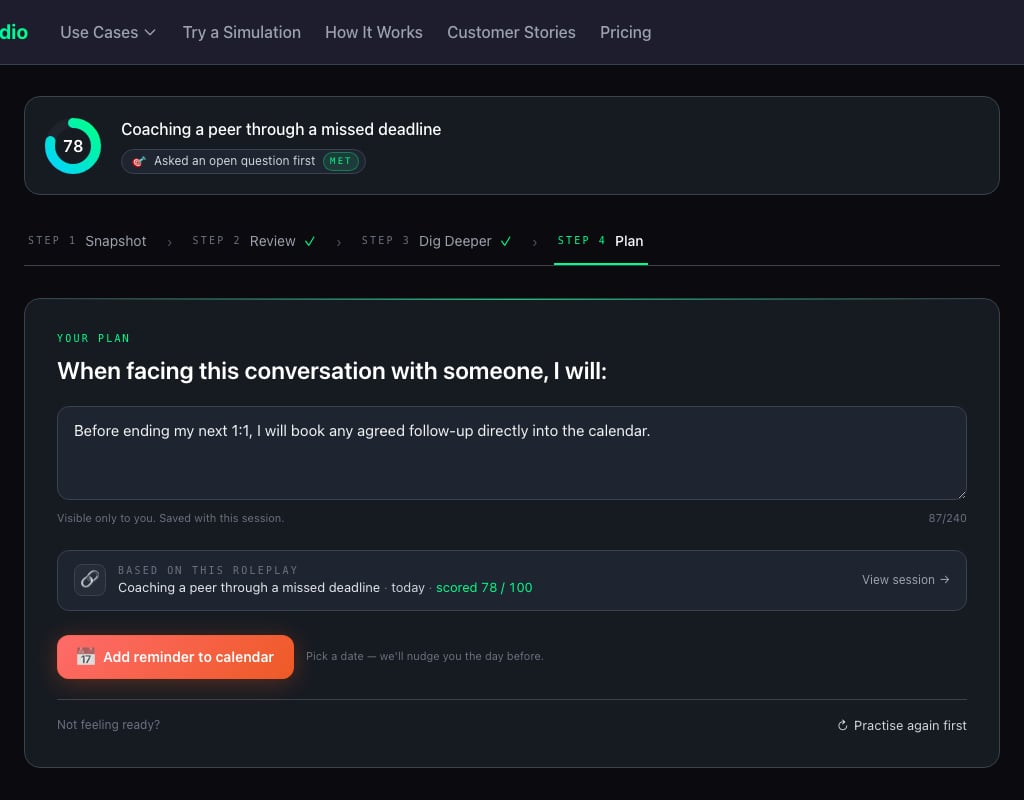
Commitment and reflection, optional calendar reminder, **Practise again**.
### Step 1 — Snapshot
The entry point — headline numbers before diving into detail.
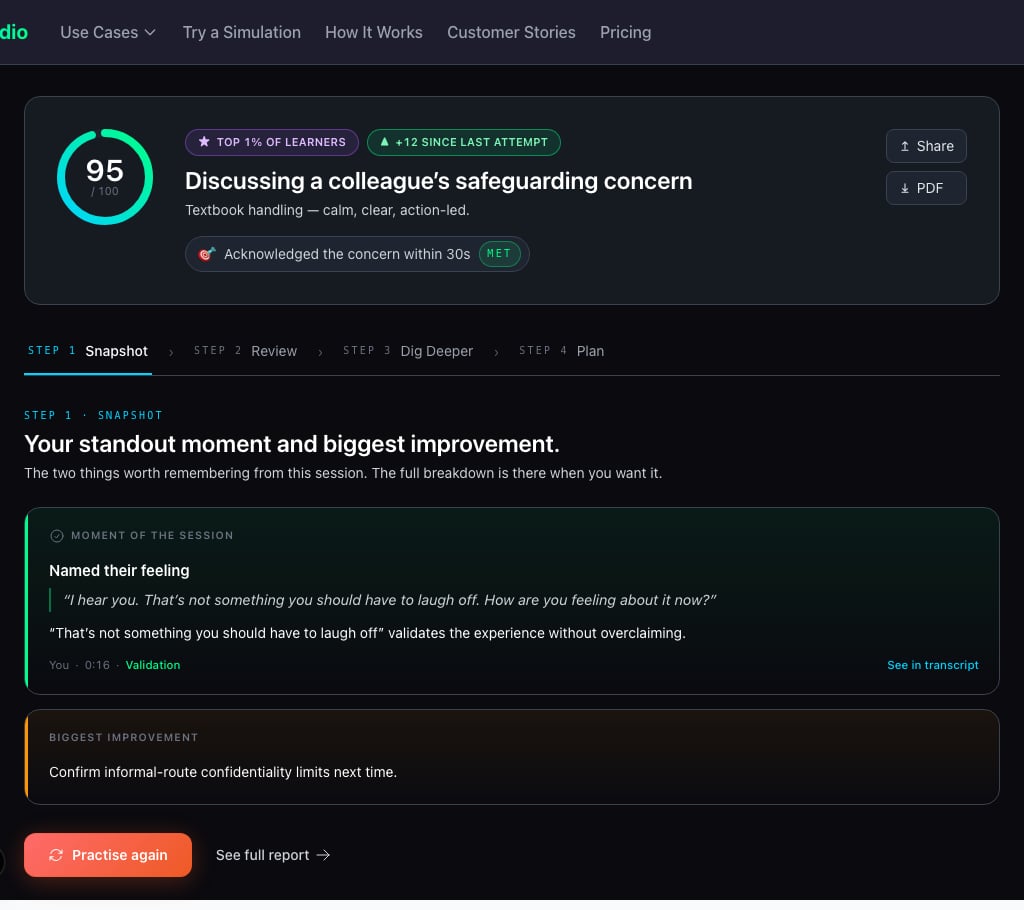 | Element | Purpose |
| ---------------------- | --------------------------------------------------- |
| **Overall score ring** | Headline session score |
| **Win / next cards** | What went well and what to improve next |
| **Cohort rank pill** | Compare performance vs other learners in the studio |
| **Step navigation** | Snapshot → Review → Dig Deeper → Plan |
### Step 2 — Review
Turn-by-turn transcript with AI coach annotations.
| Element | Purpose |
| ---------------------- | --------------------------------------------------- |
| **Overall score ring** | Headline session score |
| **Win / next cards** | What went well and what to improve next |
| **Cohort rank pill** | Compare performance vs other learners in the studio |
| **Step navigation** | Snapshot → Review → Dig Deeper → Plan |
### Step 2 — Review
Turn-by-turn transcript with AI coach annotations.
 ### Step 3 — Dig Deeper
Skills, delivery, and optional compliance scoring.
### Step 3 — Dig Deeper
Skills, delivery, and optional compliance scoring.
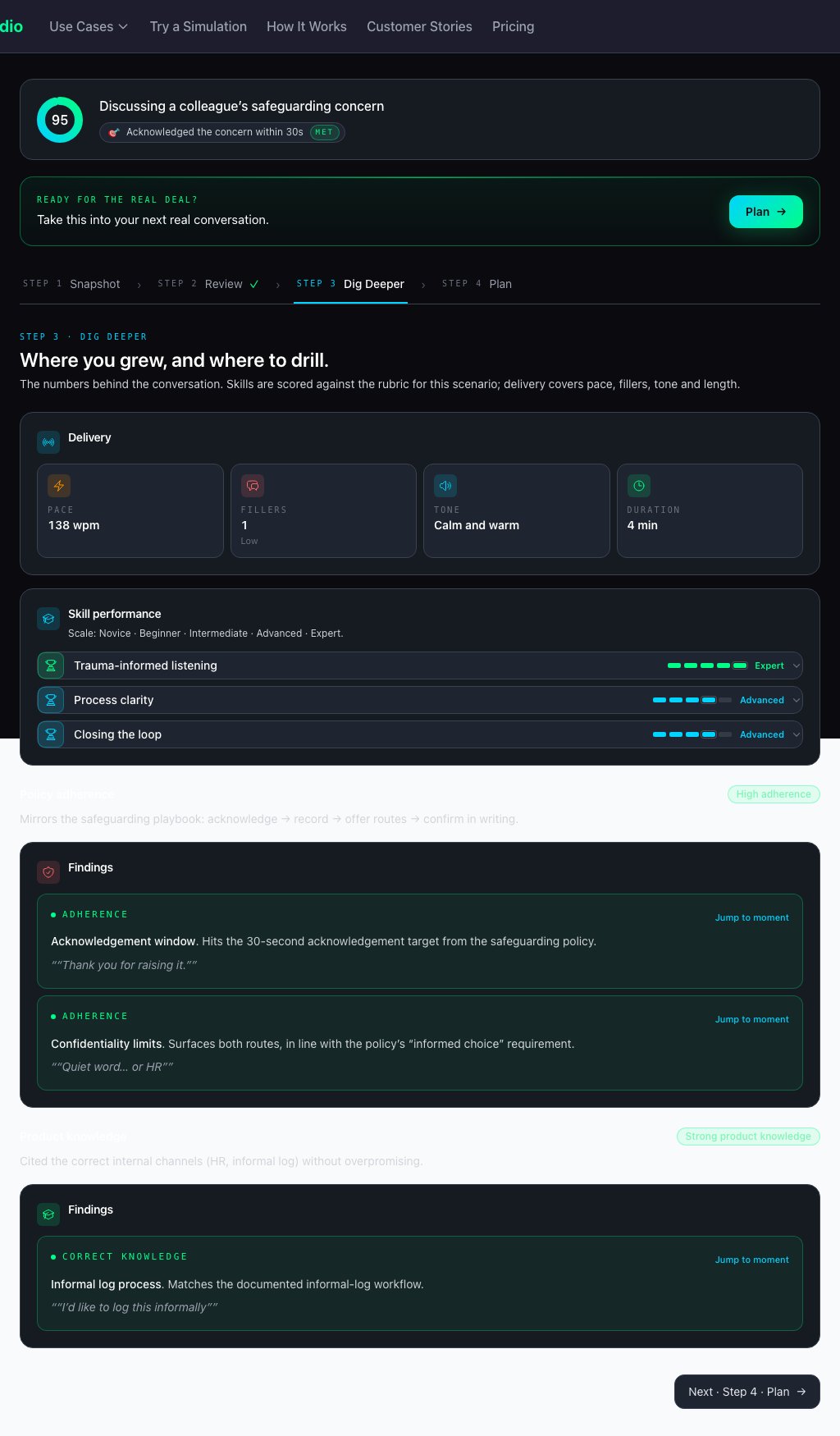 **Presence / non-verbal**, **policy adherence**, and **product knowledge** sections appear only when enabled on the scenario. Not every session includes all blocks.
### Step 4 — Plan
Close the loop with a personal commitment.
**Presence / non-verbal**, **policy adherence**, and **product knowledge** sections appear only when enabled on the scenario. Not every session includes all blocks.
### Step 4 — Plan
Close the loop with a personal commitment.
 ## Other feedback types
| Type | Key outputs |
| ------------------------------ | --------------------------------------------------------------------------------------------------------------------- |
| **Presentation feedback** | Overall AI feedback, annotated transcript, optional presence report |
| **Take Action** *(compliance)* | Guided **Recognise → Route → Record** wizard before scores appear — for anti-bribery, harassment, and MHFA categories |
## Evidence for compliance and L\&D
* **Scored transcripts** — every word captured; shareable links at `/complete/shared/[token]`
* **Realism scoring** — automatic measure of AI conversation quality *(visible to admins in session history)*
* **Preparedness tracking** — before/after confidence ratings *(when the studio enables confidence tracking)*
* **Demo email gate** — embedded demos can require email before feedback is shown
### Sharing with stakeholders
Generate a **shared feedback link** so managers, coaches, or compliance reviewers see the same polished layout as the learner — without needing a Real Talk Studio account.
## Admin reporting
Studio and org admins access completion data, transcripts, and exports from [Admin & organizations](/feature-overview/admin-and-organizations):
* **Session history** — filter by cohort, view transcripts, CSV/ZIP export
* **Analytics** — completions, scores, skills, confidence deltas, survey responses
* **Webhooks** — push completion payloads to your LMS or HR systems ([Webhook config](/webhook-config))
## Related
* [Practice experience](/feature-overview/practice-experience) — the live session that precedes feedback
* [LMS integration](/lms-integration) — embed practice and pull results via webhook or CSV
* [Product changelog](/product-roadmap/changelog) — recent feedback and session review improvements
## Other feedback types
| Type | Key outputs |
| ------------------------------ | --------------------------------------------------------------------------------------------------------------------- |
| **Presentation feedback** | Overall AI feedback, annotated transcript, optional presence report |
| **Take Action** *(compliance)* | Guided **Recognise → Route → Record** wizard before scores appear — for anti-bribery, harassment, and MHFA categories |
## Evidence for compliance and L\&D
* **Scored transcripts** — every word captured; shareable links at `/complete/shared/[token]`
* **Realism scoring** — automatic measure of AI conversation quality *(visible to admins in session history)*
* **Preparedness tracking** — before/after confidence ratings *(when the studio enables confidence tracking)*
* **Demo email gate** — embedded demos can require email before feedback is shown
### Sharing with stakeholders
Generate a **shared feedback link** so managers, coaches, or compliance reviewers see the same polished layout as the learner — without needing a Real Talk Studio account.
## Admin reporting
Studio and org admins access completion data, transcripts, and exports from [Admin & organizations](/feature-overview/admin-and-organizations):
* **Session history** — filter by cohort, view transcripts, CSV/ZIP export
* **Analytics** — completions, scores, skills, confidence deltas, survey responses
* **Webhooks** — push completion payloads to your LMS or HR systems ([Webhook config](/webhook-config))
## Related
* [Practice experience](/feature-overview/practice-experience) — the live session that precedes feedback
* [LMS integration](/lms-integration) — embed practice and pull results via webhook or CSV
* [Product changelog](/product-roadmap/changelog) — recent feedback and session review improvements