> ## Documentation Index
> Fetch the complete documentation index at: https://docs.realtalkstudio.com/llms.txt
> Use this file to discover all available pages before exploring further.
# Practice experience
> Live session capabilities for learners — video and audio roleplay, Coach Mode, team mode, and pre-session setup
This guide covers **completing a scenario as a learner** — not building one. Authors use [Scenario creation](/feature-overview/scenario-creation); learners pick a scenario from a studio or link and enter a live session.
## End-to-end learner journey
```mermaid theme={null}
flowchart LR
catalog[Studio catalog or link]
configure[Configure session]
mic[Mic test]
live[Live session]
feedback[Feedback or Take Action]
again[Practise again]
catalog --> configure --> mic --> live --> feedback --> again
```
## Live session overview
A typical **1:1 video roleplay** puts the AI partner front and centre, with a collapsible side panel for context and tools.
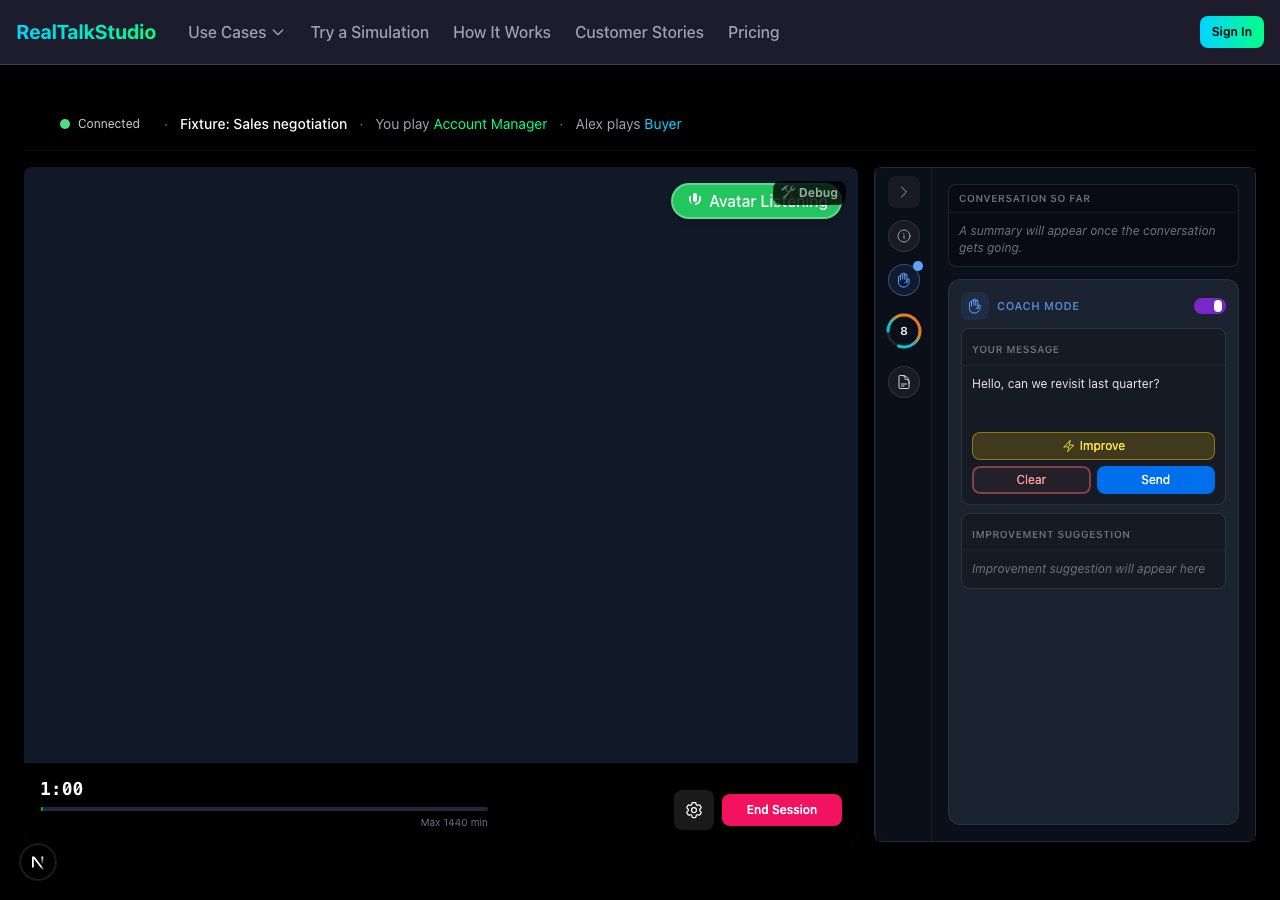 | UI element | What it does |
| ------------------- | -------------------------------------------------------------------- |
| **Video avatar** | Real-time AI conversation partner |
| **Audio only** | Voice-call format — selectable before the session starts |
| **Coach Mode** | Draft what you say before sending; get coaching tips on your message |
| **Avatar Mind** | Live read of partner composure, stance, and energy |
| **Live transcript** | Real-time conversation capture — used for post-session feedback |
| **Scenario brief** | Context, objectives, and account facts available in-session |
| **Achievements** | Skill and outcome unlocks during the conversation |
| **Session timer** | Elapsed time vs target duration |
## Pre-session configuration
Before starting, learners configure the session on the practice start screen:
* **Language** — practice language and voice locale
* **Session format** — **Video** (see and hear partner) or **Audio only** (phone-style, no video)
* **Starting stance** — AI partner personality or mood at open
* **AI partner** — when multiple personas are available
* **Warm-up** — optional simulate-before-live confidence check
* **Mic test** — microphone verification (and optional camera check when non-verbal feedback is enabled)
Corporate networks may block microphone or avatar streaming. If setup fails, see [Troubleshooting](/it-admin/troubleshooting) and [Firewall configuration](/it-admin/firewall-configuration).
## Session formats
| Format | Description |
| ---------------------- | ------------------------------------------------------------------------------------- |
| **Video (1:1)** | Default — see and hear the AI partner |
| **Audio only (1:1)** | Phone-style; no video bandwidth required |
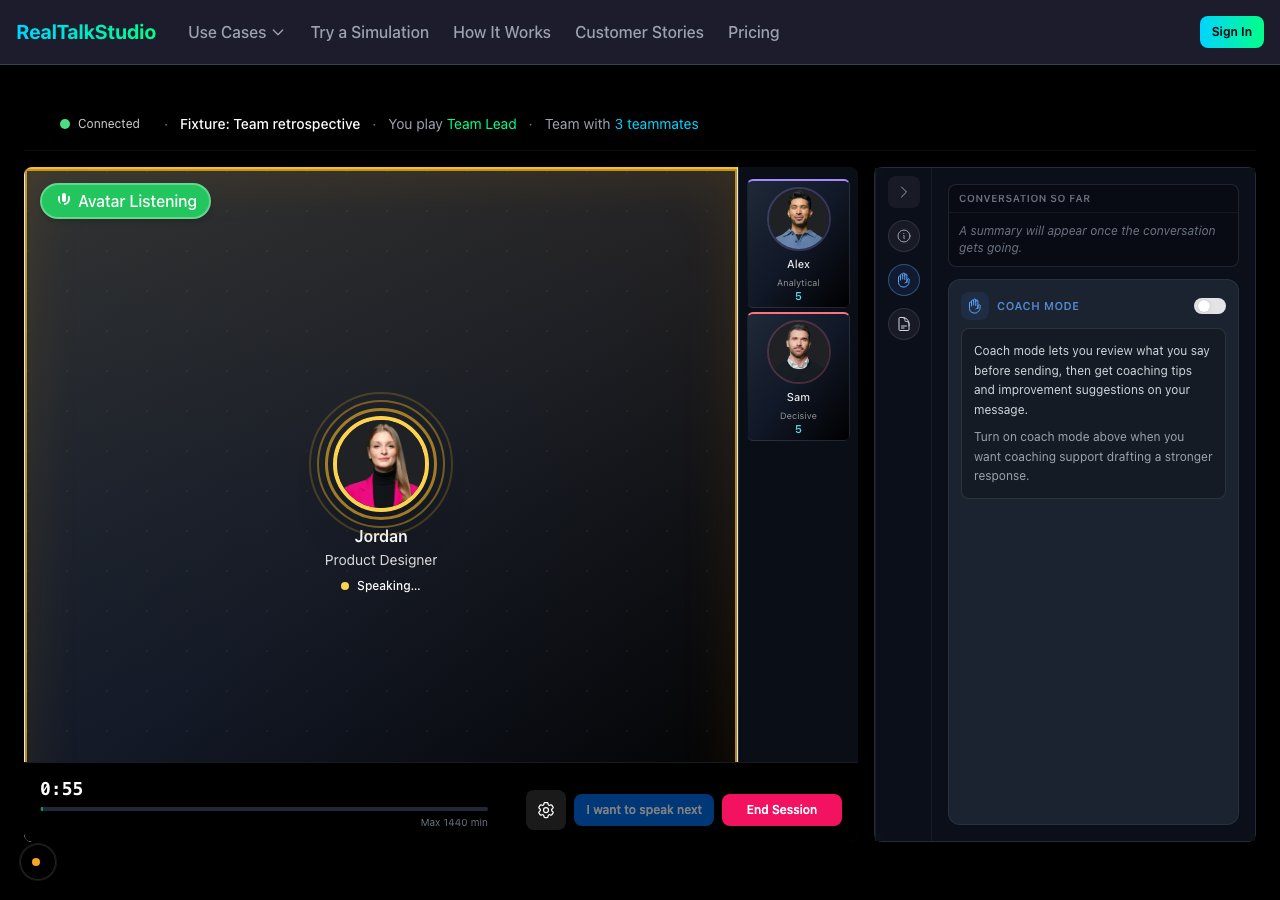
| **Team mode (video)** | Multiple AI teammates in one meeting |
| **Team audio** | Multi-person audio-only group conversation |
| **Presentation** | Screen share + simulated audience chat; advocacy/courtroom variant for legal practice |
| **Non-verbal overlay** | Optional webcam analysis for presence signals *(when enabled on the scenario)* |
| UI element | What it does |
| ------------------- | -------------------------------------------------------------------- |
| **Video avatar** | Real-time AI conversation partner |
| **Audio only** | Voice-call format — selectable before the session starts |
| **Coach Mode** | Draft what you say before sending; get coaching tips on your message |
| **Avatar Mind** | Live read of partner composure, stance, and energy |
| **Live transcript** | Real-time conversation capture — used for post-session feedback |
| **Scenario brief** | Context, objectives, and account facts available in-session |
| **Achievements** | Skill and outcome unlocks during the conversation |
| **Session timer** | Elapsed time vs target duration |
## Pre-session configuration
Before starting, learners configure the session on the practice start screen:
* **Language** — practice language and voice locale
* **Session format** — **Video** (see and hear partner) or **Audio only** (phone-style, no video)
* **Starting stance** — AI partner personality or mood at open
* **AI partner** — when multiple personas are available
* **Warm-up** — optional simulate-before-live confidence check
* **Mic test** — microphone verification (and optional camera check when non-verbal feedback is enabled)
Corporate networks may block microphone or avatar streaming. If setup fails, see [Troubleshooting](/it-admin/troubleshooting) and [Firewall configuration](/it-admin/firewall-configuration).
## Session formats
| Format | Description |
| ---------------------- | ------------------------------------------------------------------------------------- |
| **Video (1:1)** | Default — see and hear the AI partner |
| **Audio only (1:1)** | Phone-style; no video bandwidth required |
| **Team mode (video)** | Multiple AI teammates in one meeting |
| **Team audio** | Multi-person audio-only group conversation |
| **Presentation** | Screen share + simulated audience chat; advocacy/courtroom variant for legal practice |
| **Non-verbal overlay** | Optional webcam analysis for presence signals *(when enabled on the scenario)* |
 ## In-session tools
* **Coach Mode** — Review your message before sending; receive improvement suggestions
* **Account position panel** — Scenario-specific customer or account facts as ground truth during the session
* **Connection health** — Status indicator and recovery if avatar video fails (session can continue audio-only)
* **On-topic guardrails** — Sessions warn and may end if conversation drifts too far off the scenario objective
## Finding scenarios
| Surface | Route | Purpose |
| ------------------ | --------------------------------------------------------------- | ------------------------------------------------------ |
| **Studio landing** | `/studio/[slug]` | Branded home with learning path and **Start Practice** |
| **Studio catalog** | `/studio/[slug]/catalog` | Full list of assigned scenarios |
| **Practice Home** | `/profile` | Personalised next-up, streak, recommendations |
| **My Roleplays** | `/my-roleplays` | Personal content library |
| **Leaderboard** | `/studio/[slug]/leaderboard` | Rankings by score and completions *(when enabled)* |
| **Free demos** | [start-practice](https://www.realtalkstudio.com/start-practice) | Try simulations without an account |
How learners get into a studio (invite, SSO, embed, etc.) is covered in [Admin & organizations — How learners access a studio](/feature-overview/admin-and-organizations#how-learners-access-a-studio).
## Prerequisites
| Requirement | Notes |
| ----------- | ---------------------------------------------------------------------------------------------------------------------------------------- |
| **Credits** | Sessions consume credits from org, studio, or member balance — or personal purchase at [Credits](https://app.realtalkstudio.com/credits) |
| **Browser** | Modern Chromium browser recommended; working microphone required |
| **Desktop** | Required for presentation practice |
| **Webcam** | Only when non-verbal / presence feedback is enabled on the scenario |
## After the session
When the session ends, learners move to [Feedback & evidence](/feature-overview/feedback-and-evidence) — or a **Take Action** compliance gate first for certain scenario categories (anti-bribery, harassment, MHFA).
## Related
* [Scenario creation](/feature-overview/scenario-creation) — how scenarios are built
* [LMS integration](/lms-integration) — practise inside your course without a separate studio login
* [Supported languages](/supported-languages) — locale and voice options
## In-session tools
* **Coach Mode** — Review your message before sending; receive improvement suggestions
* **Account position panel** — Scenario-specific customer or account facts as ground truth during the session
* **Connection health** — Status indicator and recovery if avatar video fails (session can continue audio-only)
* **On-topic guardrails** — Sessions warn and may end if conversation drifts too far off the scenario objective
## Finding scenarios
| Surface | Route | Purpose |
| ------------------ | --------------------------------------------------------------- | ------------------------------------------------------ |
| **Studio landing** | `/studio/[slug]` | Branded home with learning path and **Start Practice** |
| **Studio catalog** | `/studio/[slug]/catalog` | Full list of assigned scenarios |
| **Practice Home** | `/profile` | Personalised next-up, streak, recommendations |
| **My Roleplays** | `/my-roleplays` | Personal content library |
| **Leaderboard** | `/studio/[slug]/leaderboard` | Rankings by score and completions *(when enabled)* |
| **Free demos** | [start-practice](https://www.realtalkstudio.com/start-practice) | Try simulations without an account |
How learners get into a studio (invite, SSO, embed, etc.) is covered in [Admin & organizations — How learners access a studio](/feature-overview/admin-and-organizations#how-learners-access-a-studio).
## Prerequisites
| Requirement | Notes |
| ----------- | ---------------------------------------------------------------------------------------------------------------------------------------- |
| **Credits** | Sessions consume credits from org, studio, or member balance — or personal purchase at [Credits](https://app.realtalkstudio.com/credits) |
| **Browser** | Modern Chromium browser recommended; working microphone required |
| **Desktop** | Required for presentation practice |
| **Webcam** | Only when non-verbal / presence feedback is enabled on the scenario |
## After the session
When the session ends, learners move to [Feedback & evidence](/feature-overview/feedback-and-evidence) — or a **Take Action** compliance gate first for certain scenario categories (anti-bribery, harassment, MHFA).
## Related
* [Scenario creation](/feature-overview/scenario-creation) — how scenarios are built
* [LMS integration](/lms-integration) — practise inside your course without a separate studio login
* [Supported languages](/supported-languages) — locale and voice options